Shop-alongs are one of the most effective methods for understanding how consumers actually behave during a shopping experience — the hesitations, the distractions, the moments that drive or derail a purchase. Whether you are studying in-store navigation, product discovery or the path to checkout on an e-commerce site, shop-alongs put you alongside participants in real time rather than relying on recall after the fact.
Key takeaways
- Shop-alongs work for both online and brick-and-mortar experiences — and the right platform supports both
- Screen recording and video capture let researchers observe exactly what participants see and do as it happens
- Asynchronous shop-alongs give participants the flexibility to complete tasks during their natural shopping routine
- AI-assisted analysis helps manage the volume of qualitative data shop-alongs generate
- Clear instructions and realistic expectations are the most reliable predictors of response quality
In this post, we will cover:
- How to host shop-along activities using Recollective
- Setup for online and in-store shop-alongs
- Moderation and analysis of results
Shop-along activities in Recollective
Shop-alongs work best when researchers can observe an experience from the participant's perspective rather than asking them to reconstruct it afterward. Recollective supports screen recording, video capture, photo uploads and microphone audio — the tools that make that level of immersion possible.
You can program introductions, missions or challenges, and qualitative or quantitative follow-up questions directly into your study. Because the platform lets you add activities even after a study has launched, you can adapt your approach as responses come in rather than committing to a fixed structure upfront.

Online shop-alongs
Online shop-alongs are well-suited to studying e-commerce behavior, digital shelf navigation and user experience with any web-based interface. Screen recording captures what participants see and do as they move through a site, with the option to include microphone audio so they can narrate their experience or respond to probes as they go.
You can give participants an open brief — shop however you normally would — or assign specific missions: find a product in a particular category, compare two options, complete a checkout. Observing where participants succeed, where they hesitate and what ultimately influences the decision is where the insight lives.
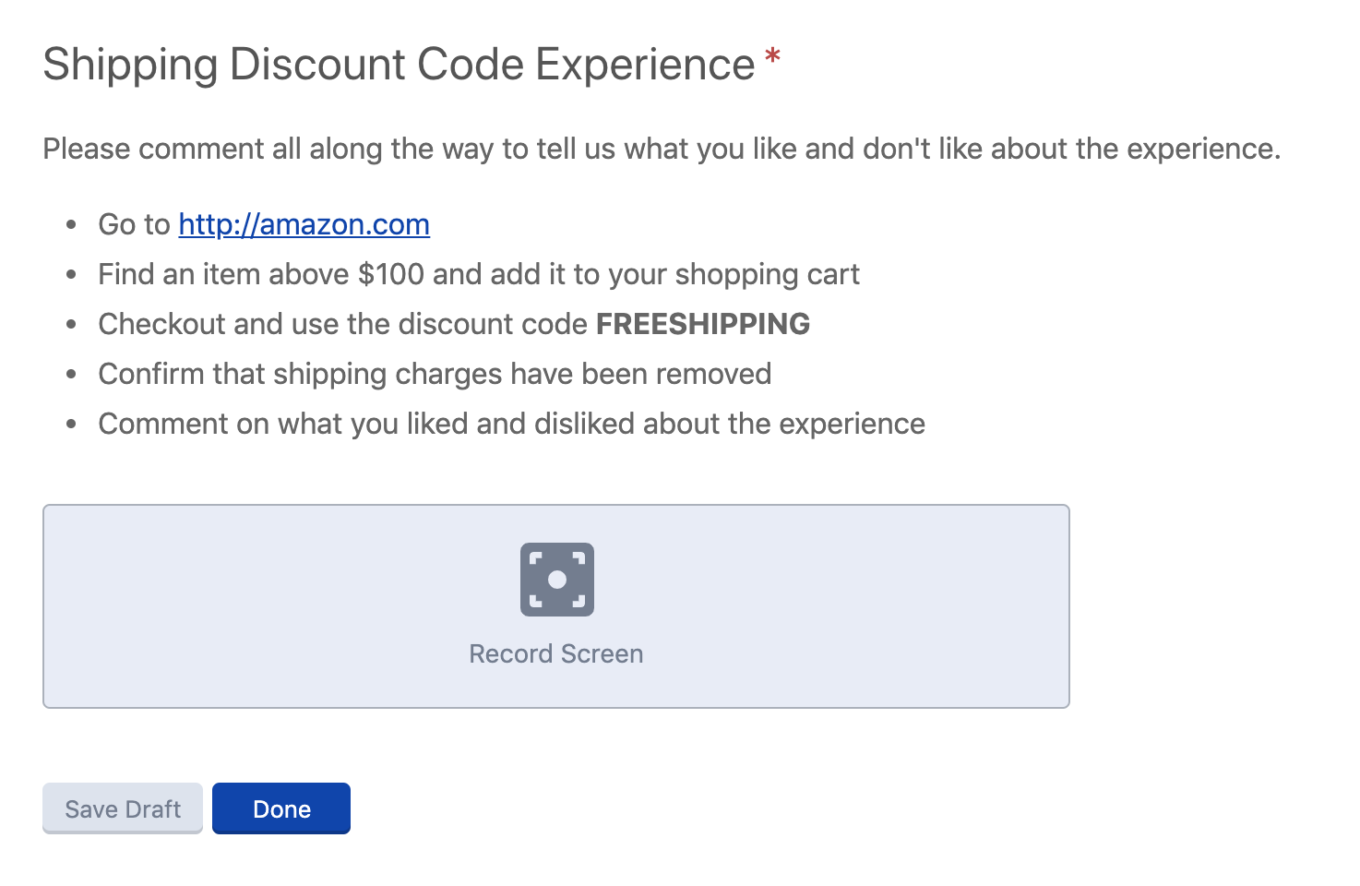
Building a shop-along activity in Recollective
Setting expectations
Before recruiting begins, participants should understand what the shop-along involves — particularly for in-store studies where they will need to plan time for a physical shopping trip. Make expectations clear during the recruit and reinforce them through custom email invitations, agreements or screening questions within the platform.
Programming into Recollective
Choose your task types based on what you need to learn. A few options that work well for shop-along design:
The Multimedia Task supports multiple response types — text, photo, video, screen recording and file uploads — in any combination. For an online shop-along, it may be the only task type you need: provide instructions, ask participants to record their screen and narrate their experience, and allow written follow-up for anything not captured on video. Full recordings can be excerpted into shorter clips for analysis and reporting.

For participants less comfortable on camera, the Multimedia Task gives them the flexibility to respond in the format that works for them. You can ask "What is the first thing you notice when you walk into the store?" and accept text, a photo, a video — or a combination.

The Fill the Blanks Task is better suited to specific or structured questions. It supports photos, polls, scale ratings and allocation exercises on a single page, which makes it practical for capturing detailed responses while minimizing friction for participants on mobile.

Tips for brick-and-mortar shop-alongs
Recollective works on all smart mobile devices, so participants can complete activities in the store in real time — either through a Live Video Interview or by uploading photos and videos directly from the floor.
- If using Live Video Interview, schedule participants at times that match their normal shopping routine
- If using asynchronous video, give participants the option to respond in the moment or upload after the fact — some participants engage more freely without the structure of a live session
- Provide a list of instructions or questions in advance so participants can complete the activity even if they face connectivity issues in the store
- Use custom email reminders or a downloadable brief on the study Home page to keep instructions accessible throughout the mission
- Ask participants to capture several shorter videos rather than one long recording — they upload more quickly and are easier to work through during analysis
- Require photo descriptions so participants provide context for their images rather than leaving interpretation to the researcher
Moderation and Analysis
Shop-alongs generate a significant volume of qualitative data — text, photos, videos and transcripts. Recollective has tools built in to help manage and analyze it without losing the richness in the process.
The Word Cloud surfaces the most frequently used terms across the study, giving an early signal of key themes to explore in depth.
Videos are automatically transcribed, which allows you to search, excerpt and code without working through full recordings manually. Excerpts generate a short video clip alongside the transcribed text, making it straightforward to build highlight reels for client presentations or internal stakeholders.
AI-assisted analysis helps move through large volumes of unstructured data more quickly — identifying themes, tagging responses and surfacing patterns across the participant set. The researcher stays in control of interpretation; the tooling handles the volume.

Use Case: Grocery Shop-along
Goal: Understand how shoppers discover and evaluate products in a specific category — online and in-store — to identify where the purchase journey breaks down and what drives the final decision.
Using a Fill the Blanks Task, ask participants a closed question about whether they will complete the mission online or in-store. That response creates a segmentation variable for comparative analysis later. Follow with an open-ended question about their usual approach to shopping in this category and an allocation exercise to understand how they distribute their consideration across brands or product types.
Using a Multimedia Task, give participants their shopping mission as a downloadable brief accessible from the study Home page. Ask online shoppers to screen-record their session and narrate as they go. Ask in-store shoppers to capture photos and short videos at key moments — arriving at the shelf, comparing options, making the final decision. A few probing questions in the activity instructions focus their attention without over-directing the experience.
In the Summary stream, follow up based on what participants captured. Probe the moments where hesitation appeared or engagement dropped. If the study is social, participants can respond to each other's experiences — which often surfaces comparisons and context that individual responses miss.
Use the Online and In-Store segmentation to run a comparative analysis and identify where the path to purchase diverges between the two contexts.
Ready to run your first shop-along? Recollective supports online and in-store shop-along research with screen recording, live video and asynchronous activities — on a single platform. Get a Demo
Frequently asked questions
What is a shop-along study? A shop-along is a research method in which participants document their shopping experience — online or in-store — using video, screen recording, photos or written responses. Unlike post-purchase surveys, shop-alongs capture behavior and decision-making as it is happening rather than in retrospect.
What is the difference between an online and in-store shop-along? An online shop-along uses screen recording and audio to observe how participants navigate a website or app. An in-store shop-along uses mobile video and photo uploads to document the physical retail experience. Both can be run asynchronously, and both can be combined in the same study for comparative analysis.
Can a shop-along be run asynchronously? Yes. Participants complete activities on their own schedule — during an actual shopping trip rather than a scheduled session. Asynchronous shop-alongs produce more naturalistic behavior and are easier to field across time zones or around varied participant schedules.
What do participants need for an online shop-along? A computer or mobile device with screen recording enabled. Recollective's built-in screen recording tool handles this without requiring participants to install additional software.
How do you analyze shop-along data at scale? Recollective supports automatic video transcription, excerpt creation and AI-assisted thematic analysis. For larger studies, coding as responses come in — rather than leaving all analysis to the end — keeps the data manageable and allows researchers to follow up with participants while the experience is still fresh.
How long does a shop-along activity take? It depends on the shopping mission. Online shop-alongs typically run 20-40 minutes. In-store shop-alongs may require a full shopping trip. Build that time commitment into your screener so participants understand what they are agreeing to before they enroll.