Ask AI:
Instant Answers You Can Trust
Don't get stuck searching when stakeholders need answers now. Recollective Ask AI delivers rapid answers grounded in your research data and supported by verbatim evidence, so you can act quickly with confidence.
Get a Demo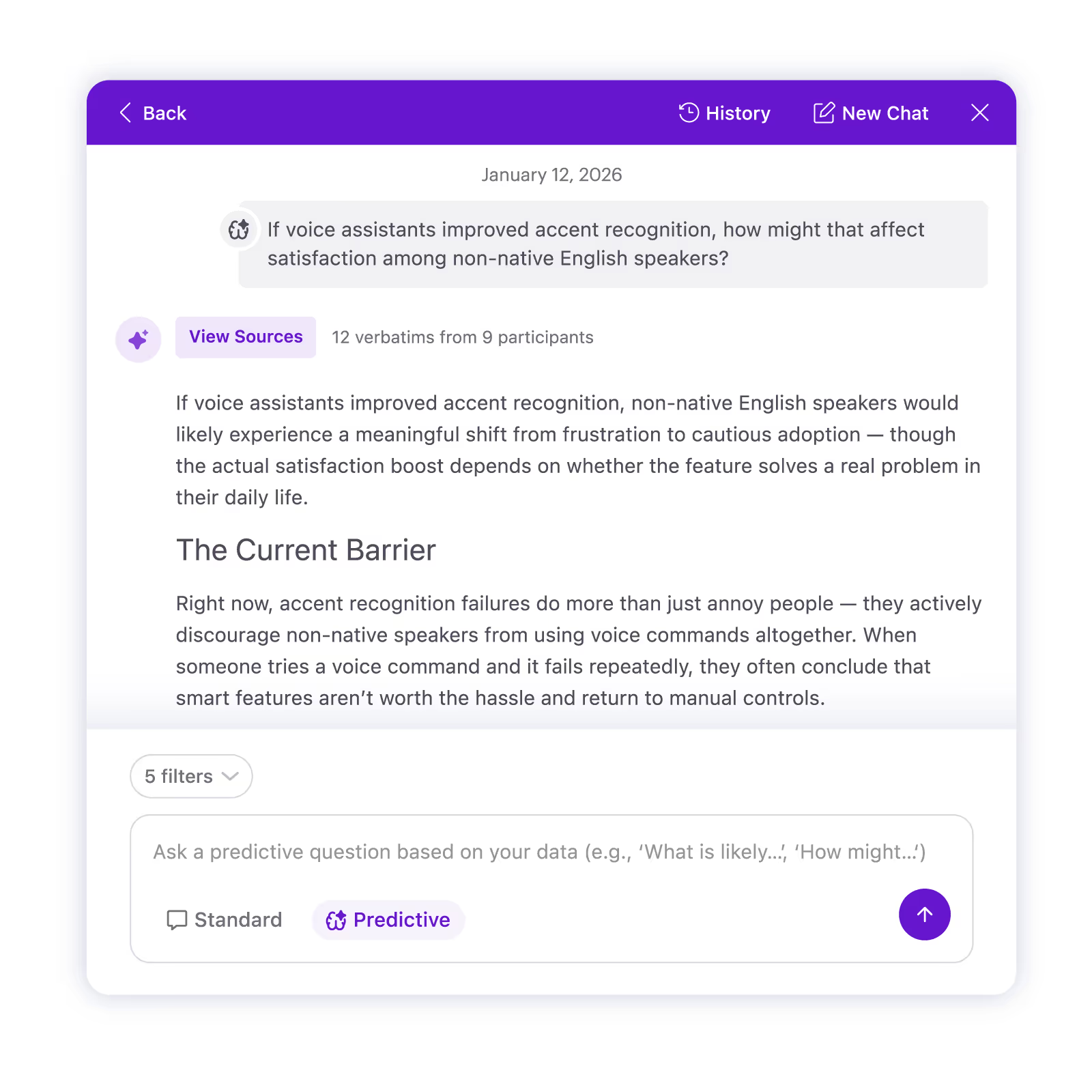
What you can do with Recollective Ask AI
Ask naturally. Iterate quickly. Answer confidently.
Ask AI: Standard Mode - Ask and Validate
Synthesize at speed, stay accountable to the data.
Ask AI generates fast, focused answers grounded in your research data, with links straight to the supporting verbatims. Use it to pinpoint what is driving sentiment, surface the statements that matter and compare perspectives across segments, without losing the proof.
Ask questions like:
- What is driving satisfaction or frustration right now?
- How do Segment A and Segment B differ on this topic?
- What words do participants use to describe the ideal experience?
Every answer includes source verbatims with a relevancy score, so you can validate quickly and save ready-to-use excerpts for reporting.
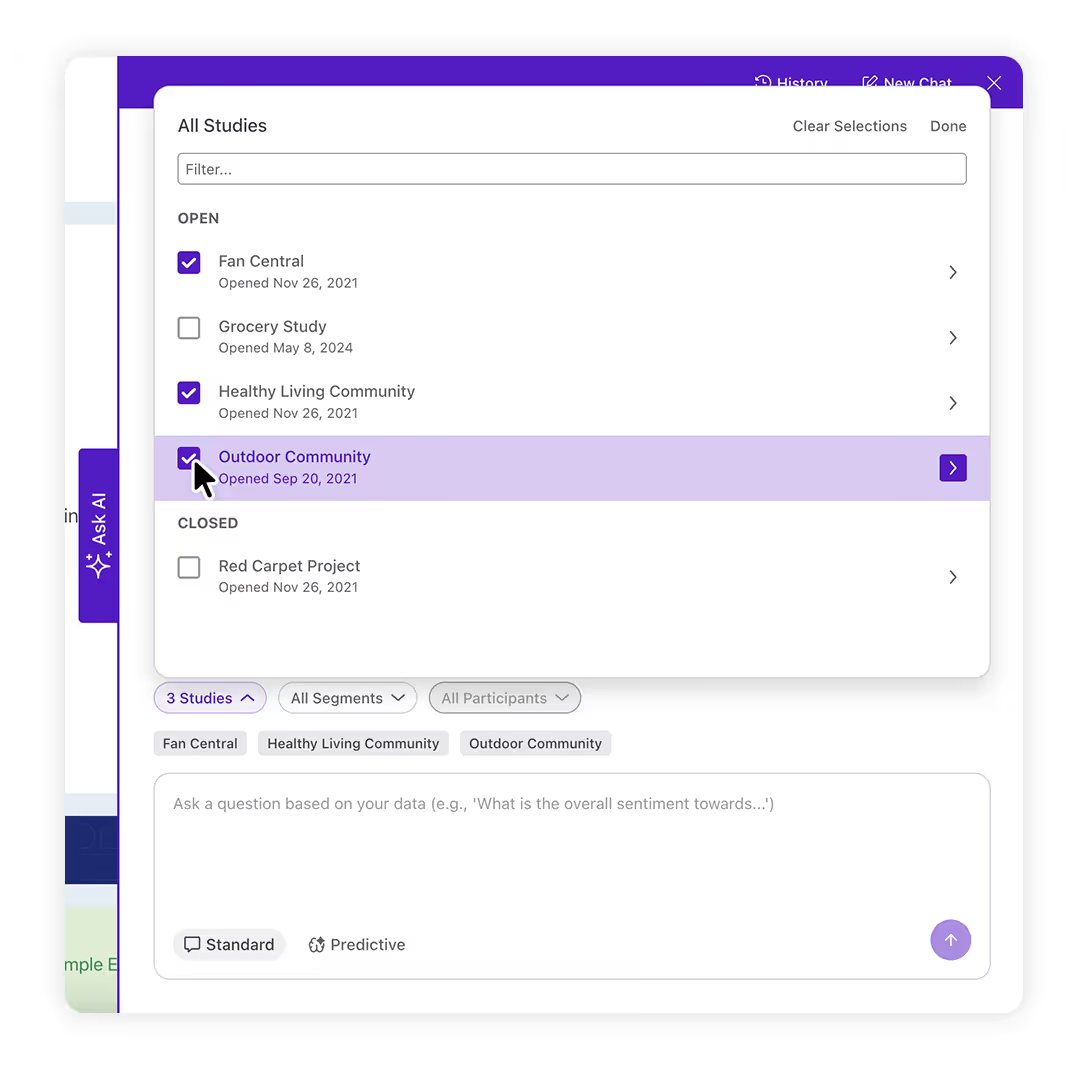
Ask AI: MultiProject Mode - Connect Insights Over Time
Unlock the unlimited potential of your data over time and across studies. With MultiProject Mode data from any number of projects in your Recollective site is used to answer questions. This makes it easy to spot what is consistent, what is changing and where different audiences diverge, without stitching together spreadsheets or duplicating analysis.
Use it to:
- Validate whether a theme holds across studies or is isolated to one project
- Compare segments or regions across multiple datasets
- Track how sentiment shifts over time or between studies
What you get: clear synthesized answers plus the underlying source verbatims, so your team can quickly confirm the evidence and bring cross-study perspective into stakeholder decisions.
Ask AI: Predictive Mode - Move From Insight to Foresight
Predictive Mode expands Ask AI beyond what participants have already stated by using patterns in your qualitative data to generate hypothetical responses. It is built for scenario exploration, early direction and faster decision cycles.
- See what might be next: Explore probable sentiment, behaviors and preferences grounded in real study data to spot shifts earlier.
- Stress-test ideas in minutes: Run what-if scenarios to test direction, validate assumptions and uncover risks without added time or cost.
- Craft evidence-backed hypotheticals: Predicted responses are generated from patterns in existing feedback, with transparent supporting source content so teams can judge fit and confidence.
- Stay one step ahead: Combine what participants have said with modeled responses to anticipate needs and reduce surprises
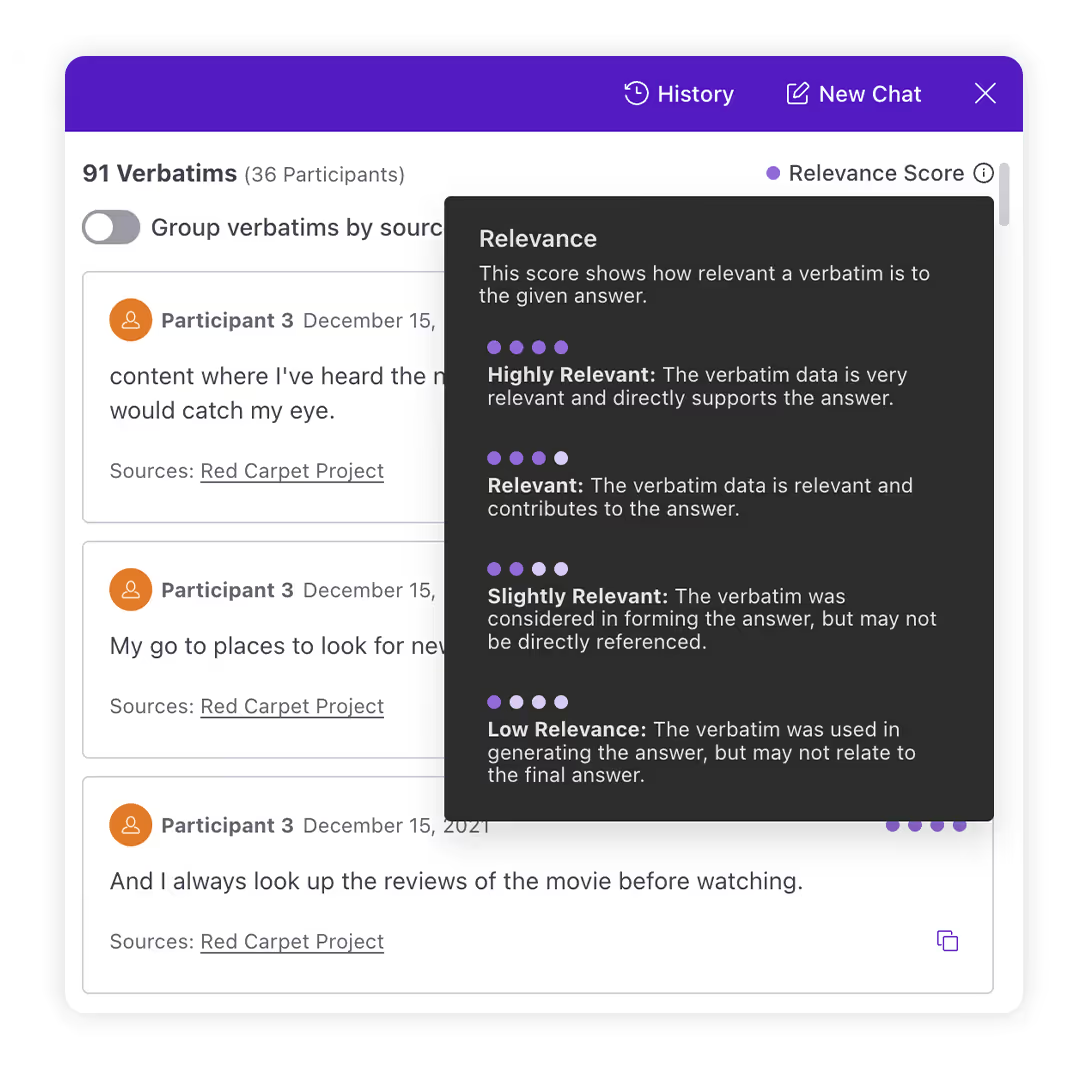
Every answer includes source verbatims with a relevancy score, so you can validate quickly and lift ready-to-use excerpts for reporting.
With Recollective Ask AI:Predictive Mode, you can ask study-grounded questions like:
- If pricing rises again, how might priorities shift for each segment?
- Which concept elements are most likely to create resistance and why?
- What would it take to convert “interested” participants into “ready to buy”?
How Ask AI works

Choose the right lens
Use Standard Mode to synthesize what participants said, Predictive Mode to explore likely reactions. Add MultiProject Mode to connect insights across projects.

Dial in the audience
Focus your analysis with filters for segments, activities and participant groups, to produce the most relevant output.

Follow the evidence
Ask AI shows the verbatims behind each answer, making it easy to validate, refine and return to the same thread later.
Why enterprise teams use Ask AI
Security, privacy and governance built for enterprise
- SOC 2 Type 2 compliant controls and processes
- Encryption in transit and at rest
- Global deployment options across multiple regional geographies to support data residency needs
- Customer control over AI features, including the ability to opt out
- AI sub-processor agreements that prohibit data retention for model training
Frequently Asked Questions
What is Recollective Ask AI?
Ask AI is Recollective’s AI-powered Q&A experience for qualitative research. It generates answers based on your study data, supported by source verbatims so you can validate and report with confidence.
What’s the difference between Standard Mode, MultiProject Mode and Predictive Mode?
Standard Mode answers questions based on the data in a study. MultiProject Mode extends analysis across multiple studies. Predictive Mode explores forward-looking, hypothetical questions using patterns found in your existing qualitative data.
How should we use Predictive Mode responsibly?
Use it to pressure test ideas, explore scenarios and generate hypotheses quickly. For high-stakes decisions, treat outputs as directional and validate with additional research as needed.
Can I filter what Ask AI uses in its analysis?
Yes. You can narrow the scope by project, activity, segment or participant so the answer reflects the lens you need.
Does Ask AI show supporting evidence?
Yes. Ask AI attributes outputs to supporting verbatims so you can see where findings came from and pull excerpts for reporting.
Does Ask AI update as new responses come in?
Yes. Ask AI supports real-time analysis so you can ask questions during fieldwork or after the study completes.
Does Ask AI replace qualitative analysis or a researcher’s role?
No. Ask AI speeds up exploration and synthesis, but research leadership is still required to frame questions, validate interpretations and shape the story.
Can we turn AI features off?
Yes. Recollective provides controls at the site and study level, and customers can opt out of AI features.
What security standards and safeguards support Ask AI?
Recollective is SOC 2 Type 2 compliant and uses encryption in transit and at rest. Systems are monitored and audited and deployment regions are available to support data residency requirements.
Which data types can Ask AI analyze?
Ask AI supports text responses, transcripts, discussions and captions. Ask AI does not analyze visual media on its own without accompanying text or transcription.
How do we get the best results from Ask AI?
Start with a clear scope, use filters and segment lenses, then iterate your question based on what you learn.