Why limit your research because of logistics, language or moderator availability? Recollective's Conversation Task conducts authentic, AI-moderated qualitative interviews that adapt to each participant, build on what they've already shared in the study and turn every conversation into structured, comparable summaries the moment it ends. Capture deep-dive insights at scale, in any language, at unbelievable speed.
Get a Demo
Use Recollective's Conversation Task to:

Recollective Conversation Tasks do not rely on a fixed script. The AI moderator listens to what a participant shares, then asks the next best question in the moment without losing sight of your Conversation Objective.
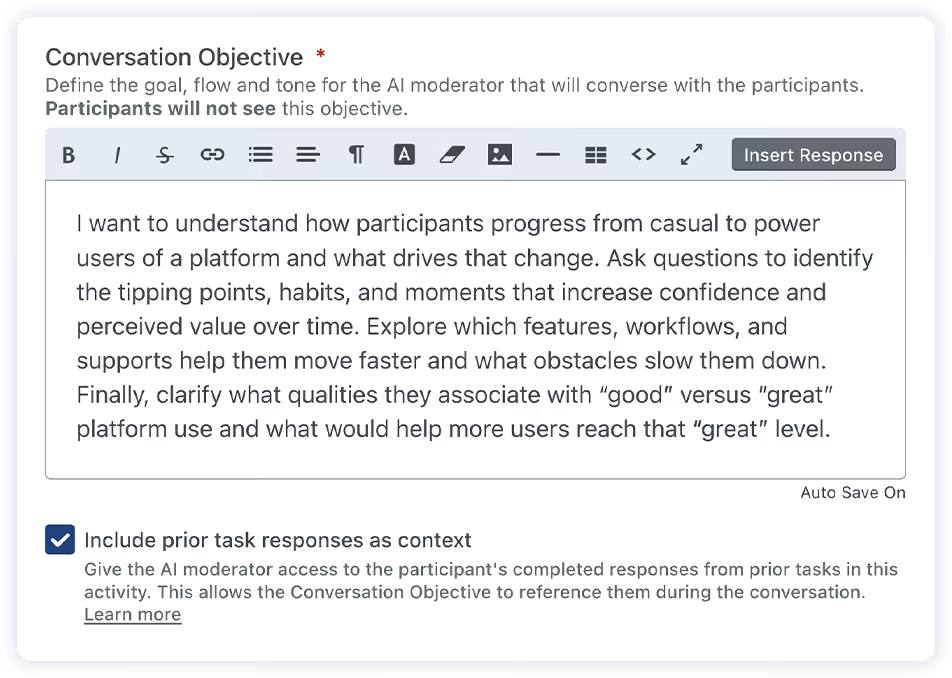
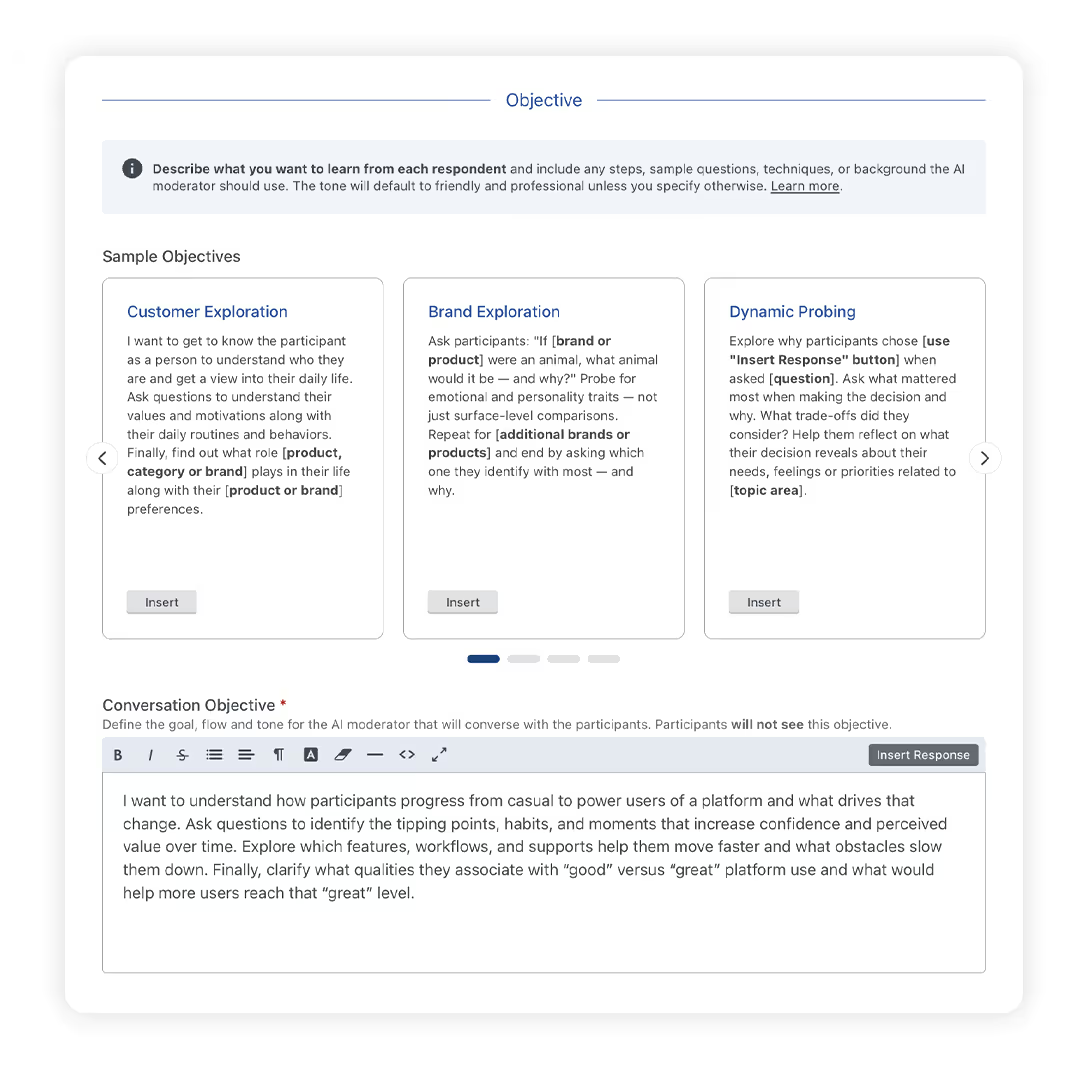
You set the goal, the flow and the tone, plus any steps, probes or sample questions you want the AI moderator to follow. From there, it adapts naturally to each response, clarifying, probing and connecting threads while staying accountable to your objective.
For participants, it feels like a real conversation that invites reflection, not a form to complete. For researchers, it delivers consistent, scalable depth you can capture asynchronously, then review, summarize and analyze immediately. Participants can respond by typing or by voice, and correct their last message if a dictated phrase came out wrong, so the conversation stays accurate from start to finish.
Most AI-moderated interviews start cold. Recollective's Conversation Task does not. With Response Awareness enabled, the AI moderator can reference a participant's earlier responses from within the same activity, including text answers, recorded video transcripts, poll selections, ranking decisions, image and video marker comments, fill-in-the-blank answers and grid ratings.
That means the conversation can clarify what someone said in a previous task, probe an inconsistency, follow a thread that emerged across multiple touchpoints or skip a question entirely when a participant has already covered it. Setup is a single checkbox under the Conversation Objective. Manual piping remains available for researchers who want more targeted control, and both methods can be used together.
The result is a connected research journey rather than a series of disconnected prompts. Participants spend less time repeating themselves. Researchers get deeper, more coherent insights without rebuilding context inside every task.

Instead of waiting days to schedule follow-ups, you get transcripts and structured summaries that are ready for review, export and analysis the moment a participant finishes.
When a Conversation Task is completed, Recollective automatically:
Conversation Summary Guidelines are auto-generated from your Conversation Objective during setup and can be edited before launch. You define the headers, prompts and order, preview a sample summary against the guidelines in a single view and refresh until the structure delivers what you need. Once the task is live, the same framework is applied to every participant, so cross-participant comparison is fast, themes are easier to spot and reporting starts in a usable format rather than a cleanup project.
"With a high‑stakes client and a short timeline, we needed actionable and detailed insights fast. The AI moderation tool allowed us to capture the underlying motivations behind participants’ responses – with an incredibly fast turnaround. The feedback we gathered ensured our client could make informed adjustments to an important product ahead of their deadline."
Amy Crosby
Senior Vice President, PSB Insights
Configure three core elements: Task name, Introduction and Conversation Objective. The introduction can include instructions and stimuli such as photos, videos or files.
Your Conversation Objective defines the goal, tone and behaviour of the AI moderator. The objective is visible to administrators but not participants. Enable Response Awareness to give the AI moderator context from each participant's earlier responses, and review the auto-generated Summary Guidelines to lock in the structure of every participant summary.
Previewing the task lets you experience the AI moderation, see a sample summary rendered against your Summary Guidelines and iteratively adjust the setup as needed.
Participants engage in a multi-turn conversation, choosing whether to type or speak their responses. They can switch between Talk and Type at any point, edit their most recent message if needed and leave and resume at their convenience. Responses are saved automatically.
Structured summaries appear in the Stream and transcripts are available immediately for review and export. Conversation content is also available inside Ask AI for deep analysis.
Conversation Task is an AI-powered task type in Recollective that enables a dynamic, one-on-one chat between a participant and an AI moderator. The conversation adapts in real time while staying guided by your Conversation Objective.
You define a Conversation Objective that specifies the goal, tone and instructions the AI moderator follows. You can include steps, probes, moderation techniques and sample questions to shape the experience.
Yes. Admins can preview the Conversation Task, observe how the AI moderates, see a sample summary generated against your Summary Guidelines and refine the objective before launch.
Yes, in two ways. Response Awareness gives the AI moderator full context from each participant's completed responses in earlier tasks across the same activity, enabled with a single setting under the Conversation Objective. You can also pipe specific prior responses into the introduction or objective for more targeted control. Both methods can be used together.
Text responses, video and screen recording transcripts, conversation history, fill-in-the-blank answers, poll selections, image and video marker comments, sort and rank decisions, grid ratings and prompt selections. Visuals in uploaded images, videos and files are not analyzed; the AI moderator works from associated text, transcripts and marker comments.
Yes. Talk Mode lets participants reply using natural speech instead of typing, and they can switch between Talk and Type at any time during the conversation.
Participants can edit their most recent message before continuing. The AI moderator updates its next reply to reflect the change, so the probing stays accurate and the transcript matches what the participant actually meant to say.
Recollective automatically saves the full transcript, generates a structured summary based on your Conversation Summary Guidelines and translates both into enabled study languages.
Yes. Conversation Summary Guidelines are auto-generated from your Conversation Objective and can be fully edited. You set the headers, prompts and order, preview a sample summary before launch and apply the same structure to every participant once the task is live, making cross-participant comparison and reporting significantly faster.
Summaries appear in the Stream and are included in Activity Transcripts. Conversation summaries and transcripts are also available within Ask AI for analysis and can be exported for reporting workflows.
Participants can view their own conversation summary alongside the transcript. If an activity is socialized, they may also access other participants' summaries and transcripts, depending on your setup.
Yes. Recollective provides customer controls over AI features, including the ability to opt out of usage.
No. Recollective’s AI sub-processor agreements prohibit data retention for model training.
Yes. Recollective supports enterprise identity provider integrations, including Okta, and also offers an SSO API that can authenticate new and returning users.