Collect video anywhere. Analyze everything in Recollective.
Recollective now accepts video and audio recordings from any source, so your entire research library lives in one place ready for AI-powered analysis.
Written By:
Recollective
Updated On:
September 22, 2026
Contents
Where Qualitative Research Data Lives Today
For research teams, using multiple tools is standard practice. Interviews happen on Zoom, focus groups on Microsoft Teams or Discuss.io, UX sessions in Maze and stakeholder conversations in a room with a recorder on the table. The upside is having a specific tool for each unique need. The downside is that data gets fragmented and is challenging to analyze together, preventing the kind of unified analysis that produces a cohesive, top-line story for stakeholders. Past research gets left behind, with each study analyzed once and then parked. That back catalogue only pays off if it lives somewhere it can be searched and compared.
As Brian, an agency researcher, perfectly summarized: "The ideal scenario would be to have a repository of all research conducted for a client hosted on a single platform."
Introducing External Content Activities
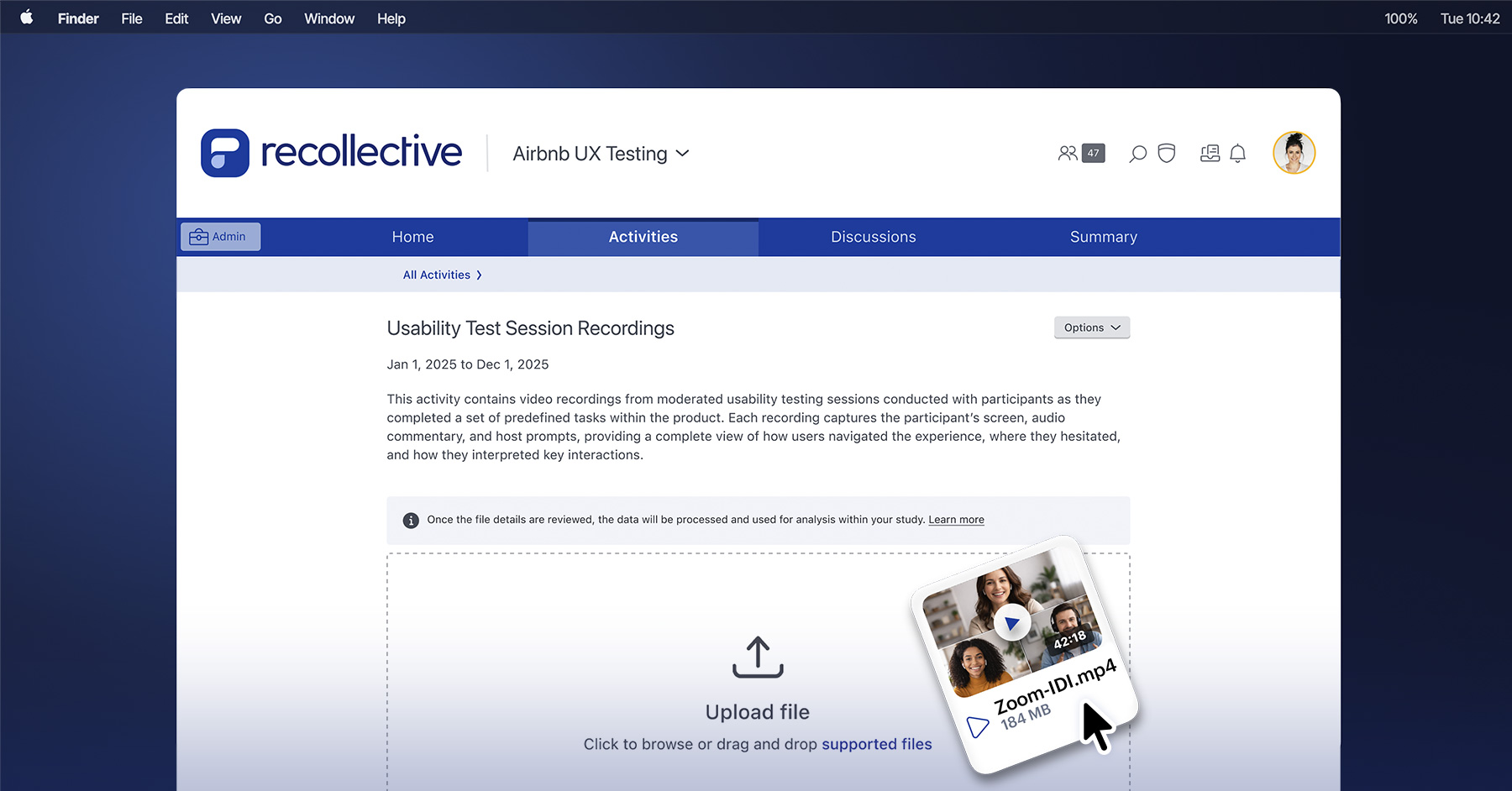
To solve this problem, Recollective built External Content Activities. Available today, this new feature enables researchers to upload video and audio recordings from any outside source directly into the platform.
Designed as a dedicated, admin-only activity, this easy-to-use drag-and-drop feature turns Recollective into a single repository for all your video- or audio-based qualitative research.
"If we run a pop-up community in Recollective and then run interviews externally on Zoom or Teams, we can use the External Content feature to bring in the transcript. Having all the reporting in one area allows us to connect all the dots for maximum efficiency." — Madalina Khan, Verve
Once external files are uploaded, the language and speakers are automatically detected and a transcript is generated. Researchers can map speakers to participants, edit the transcript and create video excerpts and highlight reels, just like natively-captured video content.
External content also immediately benefits from the analysis tools already built into the platform, including Ask AI for comparison alongside existing study data.
Core Capabilities
Capability
What it means for research teams
External Content Activity Type
A dedicated, admin-only activity to store external recordings inside a study. It stays completely hidden from participants so it never interrupts their experience.
Bulk Upload & File Management
Drag-and-drop multiple recordings at once. Easily search, filter, sort and organize files by name, date or size.
Automatic Transcription & Translation
Automatically turn audio into searchable text in the study language, with instant translation for global projects. No third-party transcription tools required.
Speaker Detection & Editing
Transcripts automatically split and tag speakers. Researchers can easily tweak names, swap speaker roles, reassign quotes or edit text on the fly.
Participant Assignment
Seamlessly connect attendees from external recordings directly to their active participant profiles, bringing their contributions into analysis alongside their in-platform activity.
AI Analysis
Analyze external data using Ask AI, generate instant AI Summaries alongside all native study data.
Excerpting & Video Clipping
Highlight, code and excerpt key video clips from transcripts, then save them straight into video playlists or export them in an Excerpts Report.
A Clearer Path to Insights
The goal with this release is to help research teams further centralize their qualitative data into one secure, searchable environment.
"Being able to bring external content into the platform is a game changer. The ability to compare analysis across our external interviews and the data collected internally on Recollective solves nearly every issue we could have." — Nilza Anibal, Wisdom Council
By eliminating the manual busywork of file management and removing the need to juggle third-party transcription tools, teams can dedicate their time to actual analysis. Bringing fragmented data into one unified space reduces time-to-insight, making it easier to find and deliver the overarching story that stakeholders need.
Frequently Asked Questions
A new activity type in Recollective for uploading video and audio recordings from any external source, including Zoom, Microsoft Teams, in-person sessions and specialist platforms, directly into a study for automatic transcription, speaker detection and AI-assisted analysis.
Any platform. Whether recordings came from Zoom, Microsoft Teams, Discuss.io, in-person sessions or other specialist platforms, they can be uploaded into an External Content Activity.
External Content Activities support a range of video and audio file formats. Read the full list of supported formats here or contact your account manager.
No. Transcription and speaker diarization happen automatically on upload, with no external tool involved. Your account manager can confirm the file specifications for your use case.
Yes. Files can be uploaded individually or in bulk via drag-and-drop.
No. Admin-only visibility keeps uploaded recordings separate from participant-facing study flows.
Yes. Admins can edit transcript text by double-clicking a word, rename hosts and attendees, swap a speaker between host and attendee and reassign a message or a single line to the correct person. Updated names carry through to AI outputs and transcript exports.
Yes. Assign any attendee in an external transcript to an active participant and their contributions are analyzed together with that participant's in-platform activity in Ask AI. Assignments can be removed or reassigned at any time.
Yes. Automatic or user-selected language processing during transcription supports global research programs across multiple markets.
Yes. Once uploaded, participant contributions from external recordings are immediately available in Ask AI alongside all other study data.
Yes. Highlight text in a transcript to save an excerpt, then play it back, apply a code, add it to a video playlist or leave a backroom comment. External Content excerpts appear in the Excerpts Report and behave like any other video clip in the platform.
Each file supports recording downloads and transcript exports in HTML or Excel format.
External Content Activities are available on all Recollective plans, enabled at the site level. Uploading recordings draws on your Live Video Minutes, the same credits you use for live video sessions. Talk to your account manager to turn it on for your site.
By clicking “Accept All”, you agree to the storing of cookies on your device to enhance site navigation, analyze site usage and assist in our marketing efforts as outlined in our privacy policy.